Posts

Picasso Painting Reflection

Image
  Jacqueline with Flowers is the first portrait of Picasso's second wife. It was a  starting point of a new stage in his personal life and a new period in his work. When they met, he had just begun to work on the Algerian Women series after the famous painting by Eugène Delacroix. She shot shortly after Picasso died.  Full of highly saturated vibrant colors, Pablo Picasso Jacqueline with Roses, 1956, illustrates one of the works in a series based on Jacqueline. Combining the use of delicate expressive imagery and bold abstract cubism, it helps  evoke a sense of delight and contentment.  Pablo Picasso continued creating art right until his death on April 8, 1973 at the age of 91 . He had been painting just a few hours before he died. For this assignment, we had to color over Picasso's painting and use the brush tool so we could learn more about photoshop. This didn't seem too difficult to do at first, as Picasso's painting didn't have too many colors on it, ...

Portrait In Type Shafa Hawladar

Image
This one is called Portrait in type. For this assignment, we had to create a person out of letters/symbols that are only found on the keyboard. This one was quite difficult to do, but was fun nonetheless. The hardest part to do was probably the jacket, as it had a lot of folds and stuff and  I mostly used Vs and |s to make the folds.  As for the hair, it was also difficult but not as much, I didn't really know what to do at first so I mostly ended up using parenthesis for an outline, but later put Xs, Vs, Us, and Ws to make the hair more detailed later on. While making the hair more detailed, I decided to start putting random symbols and stuff to darken the clothing colors and ended up looking different shades, which was pretty interesting. I think it turned out to look alright.  

Self Portrait in colour

Image
This one is called Self Portrait in colour.  This was much harder to do compared to the self portrait in gray, but it was more fun in comparison. Not the biggest fan of coloring but getting to color and create a background was fun to do. I was also able to fix any mistakes I made in the self portrait in gray. The owl was a bit difficult but I like how it turned out. I like nature and also used to do one color drawings so making the forest  background was probably  my favorite part of the whole thing.  Putting color on my jacket and stuff was a bit hard, but I had fun fixing my hair and adding highlights and stuff to it. Overall, I really like how it turned out.

Character Design Workshop at the Museum of Illustrators

Image
 In the  character design workshop, we used pencils and  paper, colored pencils and markers to make our own character panels for a short story. The techniques  that were used were to make the panel were  changing the type sizes, and  using different fonts and various art styles along with small panels and storyboards to create a scene. We  had also learned how to create a character in different perspectives like front facing, back and side view, along with various facial expressions to show emotion. Getting used to drawing them over and over again while making it look similar sounded difficult but once drawing the facial expressions and stuff, it wasn't that hard, just a bit tiring. These skills can relate to the career of a graphic designer because you are designing characters and panels and playing around with type and stuff for children's books and these skills you use to create those can be applied to other things as well. We had seen some famous c...

Self Portrait in gray

Image
This  one  is  called  self  portrait  in  gray. For this one, we had to make a self portrait of ourselves by using a photo we took and turning it gray. We had to use the pen tool to trace over the shapes and  try to make it look like the picture. The most difficult part to do was  probably the  other eye. While trying to trace it, the eye and the shadow had the same shade and looked like it was merged together. Tracing it along with the hair took a while, as every time I tried to make a new object, it wouldn't let me close it if it was too close to another line so I had to do a lot of undoing.  Also, having to match the shades with the picture took a while since the eyedropper tool didn't work for some reason, but other than that, I think it ended up fine. The  background and jacket were much easier to do in comparison, I probably should have went from lightest to darkest but I ended up doing it darkest to lightest. Although t...

Analog and Digital colour

  What are pixels? They are squares that make up an image on a   screen .  How is color viewed in computer monitors? Monitors use red, green and blue to create different colors .  What is the additive color space? Digital   Monitors mix red, green and blue  light to display colors.  Additive color starts with black and adds red, green and blue light to create colors. More color added makes the result get lighter.     Describe which additive color sliders values in InDesign you would use to make white and black. Mixing cyan, magenta, and yellow should make black, and red, green, and blue would make white, so adding those in different amounts would make color lighter.  What is the subtractive color space? Subtractive color starts with white  and ends with black ; as color gets added, the result gets darker. Cyan, magenta and yellow is used to control the amount of red, green and blue light reflected from white paper.  D...

Tik Tok Marketing

Facts about TikTok: About 1000,000,000 people are on TikTok, watching 1000,000,000 videos per day. Most people on TikTok are either Millenials, or Gen Z. 92% of people are likely to take action  after watching an Advertisement on TikTok.  How to create TikTok ads that people will watch: Despite having to tell people it's an Advertisement, it's best to make the Ad blend in and make it seem interesting for people to watch. To help it blend in, it's best to make it look like any other TikTok video. It's ideal to make people interested within the first 3 seconds of a video, or they won't bother watching the rest of the video. To make people watch at least part of it, there are 3 steps: Step 1- Hop on a trend Using topics and stuff that is trending would make people more likely to watch without skipping it. Using stuff with lyrics is more  likely to lose it's popularity quick, so it would be best to use music that is likely to last longer. Step 2 Get scrappy Professi...

Text wrapping 6 column

Image
This one is wrapping text. This was pretty difficult to do, especially on the other side. The hardest one was probably the witch one, but I think it turned out to be ok. The other ones werent so bad, but I had some trouble on the scream guy.  The arm on the witch was quite difficult to wrap around and  it took a while to fix. The easiest one to do was probably blue shirt guy, it didn't have much to wrap around and I managed to get that one done quick. The second guy's arm  was a bit hard to wrap around, but I think it was way easier to fix conpared to the the other ones. Overall, I think the wrapping turned out to be ok.

Breaking the Grid Shafa Hawladar

Image
For this assignment, we had to use the 6 * 6 grids and break them using poster elements like titles/subtitles and other things. At first, I didn't really have an idea on how to do this assignment, but  I remembered stuff about type hierarchy and  googled  some fonts that would go well together. Looking for the pictures was probably the harder part of this assignment since a lot of them couldn't fit in the canvas and were quite pixelated. After a while, I managed to find some pictures that fit in the screen and an actual PNG that didn't have a secret background behind it. Remembering some stuff from type hierarchy helped with choosing text size and whether to use bold or italic and all for the other fonts. The yellow outline on the King of pop text  was mostly an accident but  I think it looks ok. Overall I think it turned out to be alright and I enjoyed making it.

Hierarchy on Grid Shafa Hawladar

Image
  This one is Hierarchy on grid 1. We weren't allowed to use bold, change colors, or size, so I decided to mess around with the paragraph settings and spaced out some text. I wanted to make the What's wrong with you? text stand out, so  I ended up spacing it out more than the others. I think it went ok. This one is Hierarchy on grid 2. This one was one of the more easier ones to make. For this one, I decided to remove some more text and make some sort of pattern with the ones remaining.  For the What's wrong with you? text, I decided to change the paragraph  settings and spaced out a bit on the other boxes. I think it turned out to be alright. This one is Hierarchy on grid 3. This one was one of the more fun ones to do. For this one, I decided to rotate some of the text and do more spacing. I also changed the title text back to how it previously was and  made a space box on 1 of them. I think it turned out ok. This one is Hierarchy on grid 4. This one was o...

Hierarchy Technicals Shafa Hawladar

Image
                                                                                                     This one has  No Hierarchy, so I just copy pasted the text onto adobe.                                                                                                                       This one was   Contrasting weight. For this one,  all I really did was copy paste the text  and bolded the Venice biennale. The fir...

Gestalt on Grid Shafa Hawladar

Image
                                                                              This one is  Proximity.  I didn't really know what to do, so I had to look up some examples and decided to  change the paragraph to be Justify and made the letters closer together. I tried not to do too much as proximity was meant to be close together and it was already like that, I think it turned out ok in the end.             This one is Continuity. This one was was of the more fun ones to do, and it was pretty easy to think of something for this one. The letters with less spacing ended up looking pretty interesting compared to the more spaced out ones, it was meant to be super close together to super spaced out. I think it turned out to be alright.   ...

Expressive words

Image
  This one is Mirror. It was one of the more easier ones, the only thing I really had trouble with was trying to make it look centered and all, but otherwise, I think it turned out alright. It was one of the first things that came to mind and all I had to do was copy and flip the word, as unlike reflection mirror flipped horizontally made more sense. This one is Backwards, it was pretty easy to do as I only had it flip it over. It wasn't so much as doing something with a word that was hard, but thinking of what words to use, one moment I have so many I can't pick, the next, I have no clue what to do. But backwards was pretty easy to think of, and didn't really require you to do much either. This one is Spaced. This one was probably one of the more difficult ones as I had trouble getting the spaces about the same length and fitting them inside the frame, the font is pretty small but not to the point that it can't be seen. I think it turned out to be alright, and it was p...

Gestalt Letters Shafa Hawladar

Image
This one is Similarity. After looking at examples and stuff on what similarity was like I immediately thought of using M and W for it as they both look the same except it's flipped. At first, it was only meant to be 8 big M and Ws reflected but later changed it up and made some more versions. The line color being different from the font color was done by accident when trying to change the colors but then I thought the idea of same color background/font and different color line would be cool so I ended up changing the 2nd and 3rd row. I think it turned out to be ok, though there's still some stuff that needs fixing. This one is Continuity. It was actually not that difficult to make, and while looking for examples of continuity, I decided to do an O chain, I think the O chain spiral is pretty simple looking and fun to do, and it seems to turn out fine. This one is Proximity. Proximity was much more difficult compared to the other ones in my opinion. I didn't have a clue on wh...

Block Set Type Shafa Hawladar

Image
  First time looking at Adobe InDesign, it seemed to be pretty complicated and all as  everything seemed a bit technical and too perfect. But messing with the types and all help take away that feeling, and I started to feel a bit more comfortable using it. Changing the font sizes and pressing random stuff trying to see how the program works was quite fun. Trying to make the spacing to be exact was a bit hard but eventually I got the hang of it. While doing the Block set type assignment, it was pretty simple to do, and learning a bunch of new keyboard shortcuts was interesting. It was mostly trying to make everything exact that was a little difficult, but I think it turned out alright. Choosing the fonts was also pretty easy, though I wasn't sure what Courier was so I had to look it up.

InDesign Thoughts Shafa Hawladar

Image
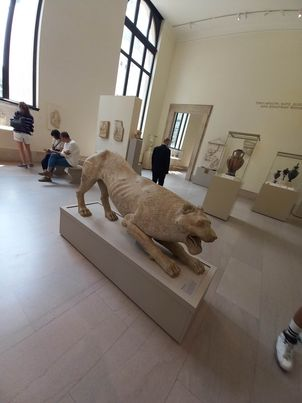
Five things that I did with the program last spring were:  At the beginning of the year, I made a list of  5 things that I wanted to complete this year, like getting good grades, finishing stuff that I was unable to   complete last year, my drawings and more. I went to the Metropolitan Museum  of Art and  took some pictures of different artifacts, and described everything that I saw in the blog. There were so many cool things that I couldn't choose which one I liked best. The lion statue and pottery shown below are some  of the many artifacts I saw in the museum. After describing the artifacts and everything else that we saw in the museum, we had to write a 300 word reflection on all that we saw in the museum. In another one of the assignments, we had to pick 3 letters and any random word and then trace them out with different type fonts that we have and  talk about the process of how we did it in the blog.  In another assignment, we had to c...